What Is a Book Blurb?
You've finished the manuscript, uploaded your files, and now Amazon's Kindle Direct Publishing dashboard is asking you to fill in a box labeled Description before it'll let you publish. That box is where your blurb goes: the short piece of sales copy that sits under your cover on the product page and does the job a back cover would do on a paperback in a store. Cambridge Dictionary defines a blurb as a short description of a book, movie, etc., written by the people who have produced it, and intended to make people want to buy it or see it. That's the sense this guide covers: the book blurb you write yourself for the Description field, not the practice of collecting praise quotes from other authors for your cover, a different practice entirely that the comparison below separates out clearly.
Book Blurb vs. Author Blurb vs. Synopsis vs. Tagline
The word blurb gets used for four different things on a book listing, and mixing them up wastes time this close to publishing. An author blurb, the endorsement kind, is a line of praise someone else writes about your book. A synopsis spoils the ending on purpose. A tagline is a single sentence, closer to a pitch than a summary. Here's what separates all four, where each one shows up, and who's expected to write it.
| Term | What It Is | Where It Appears | Who Writes It |
|---|---|---|---|
| Back-cover blurb | A short, persuasive summary built around a hook and stakes, no ending given away | KDP's Description field, a paperback's back cover, retailer listing pages | You, the author, or a copywriter working from your finished book |
| Author/endorsement blurb | A one- or two-line quote of praise attributed to another author, editor or reviewer | Front or back cover of a book, occasionally A+ Content | The person quoted, usually solicited by a publisher |
| Synopsis | A full, spoiler-inclusive account of the plot from start to finish, including the ending | Query letters, submission packages, internal marketing files, never the public listing | You, the author |
| Tagline/logline | A single sentence capturing the premise, closer to a pitch than a summary | Marketing images, the top of a blurb, social posts | You, the author |
A solo KDP publisher writing their own back-cover copy only needs the top row. If the KDP-specific terms in this table still feel unfamiliar, BookBird's self-publishing glossary defines them one at a time.
Drafting a story of your own? Draft scenes from your outline in Sudowrite, an AI writing tool built for fiction that keeps a story bible of your characters. Free trial, no card needed. (affiliate link)
Where Your Blurb Lives on KDP
Amazon KDP's Description field caps how many characters your blurb can hold, and it shows a live count as you type so you always know where you stand. The exact ceiling is set by Amazon and confirmed in KDP's own help documentation. Check the number your dashboard shows before you consider a draft finished; treat that live count as the deadline that matters, not a guess based on a word processor's tally.
The Description Field on the KDP Dashboard
Amazon KDP's Description field sits on the Details tab of your title setup, below your book's title and series information. It's a plain text box with basic formatting support, and it shows a live character counter while you type. KDP states a limit of 4000 characters for the description, and the counter includes HTML tags: bolding the word test turns 4 characters into 11. That counter is the number that matters. Word count doesn't tell you anything reliable, since sentence length varies so much from one book blurb to the next. If before you've even set up your KDP account describes where you're right now, the Description field is one of the last steps in title setup, not the first, so there's no rush.
Description vs. Printed Back Cover vs. A+ Content
The online field and a printed back cover aren't the same canvas. A paperback's physical back cover is fixed by your trim size and font, so a blurb that fits neatly online can look cramped or sparse in print. Proof both separately before approving a print copy. There's a second place blurb-like copy can live too: KDP's A+ Content, an optional module of images and short text blocks further down the product page, using its own formatting tools rather than the tags covered next.
The HTML Tags Amazon KDP Actually Renders (Bold, Italic, Line Breaks)
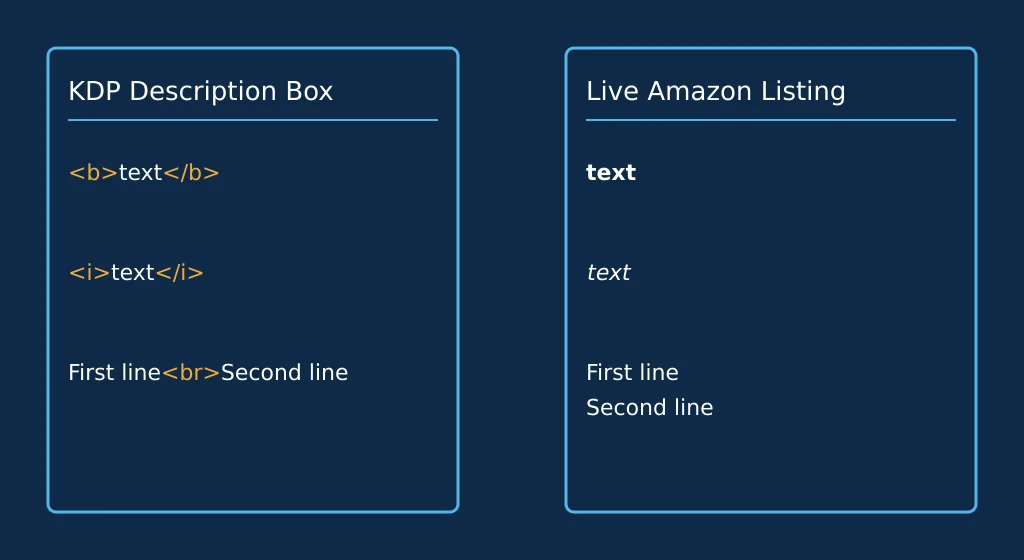
The Description field looks like plain text, but it isn't quite. This KDP product description box accepts a small set of HTML tags and treats the rest as either invisible or literal text, which is why a blurb pasted straight out of a word processor sometimes shows up with stray formatting or raw angle brackets. There's no single exhaustive list published anywhere, so treat what follows as a starting point you check against your own listing preview.
Tags KDP Renders
These are the tags authors formatting a book blurb for KDP commonly rely on, each doing one small job:
| Tag | What It Does | How to Type It | How KDP Renders It |
|---|---|---|---|
| Bold | Emphasizes a word or short phrase | <b>text</b> or <strong>text</strong> | Shows as bold text on the live listing |
| Italic | Sets off a title, a foreign word, or a quieter aside | <i>text</i> or <em>text</em> | Shows as italic text |
| Line break | Splits one long paragraph into shorter ones for readability | <br> between lines | Starts a new line without a blank paragraph gap |
Test each one on your own preview before you rely on it for a launch. What renders today can shift without notice, and checking beats assuming.
Tags KDP Strips
Tags built for full web pages typically vanish or appear as literal text inside this single field.
- Header tags like <h1> or <h2> typically get stripped or ignored, so the field never displays a true section heading.
- Inline styling, custom fonts and colors don't carry over, since the field isn't built for full CSS.
- Script or embed tags are stripped outright rather than rendered.
Write Your Blurb in 5 Steps
This is how to write a book blurb that does its job: five steps, each one doing a single thing, in order.
Step 1: Open With a Hook
Lead with the single most compelling fact, image or question your book offers. For fiction, that's usually your protagonist's situation at the exact moment everything changes. For nonfiction, especially the how-to and workbook guides many BookBird readers publish, open with the problem your book solves or the result a reader gets from using it.
Step 2: Introduce the Stakes
Name what your character, or your reader for nonfiction, stands to lose or gain. A shared motive works well here: survive, protect someone, undo a mistake. State it plainly and move on.
Step 3: Cut It Off Before the Resolution
End the blurb at the point of highest tension, before the plot resolves. A reader who already knows the ending has no reason left to open the book.
Step 4: Add a Genre or Comp Signal
One line naming your genre, a comparable author, or the kind of reader who'll like it helps someone scrolling a category page recognize your book as theirs immediately.
Step 5: Format It for KDP
Paste your finished blurb into the Description field as plain text first, confirm it reads well, then wrap only the words that need bold or italic and break long paragraphs with line breaks. Watch the character counter as you go, not after you're finished.
Worked Example: Turning a Flat Draft Into a Blurb That Sells
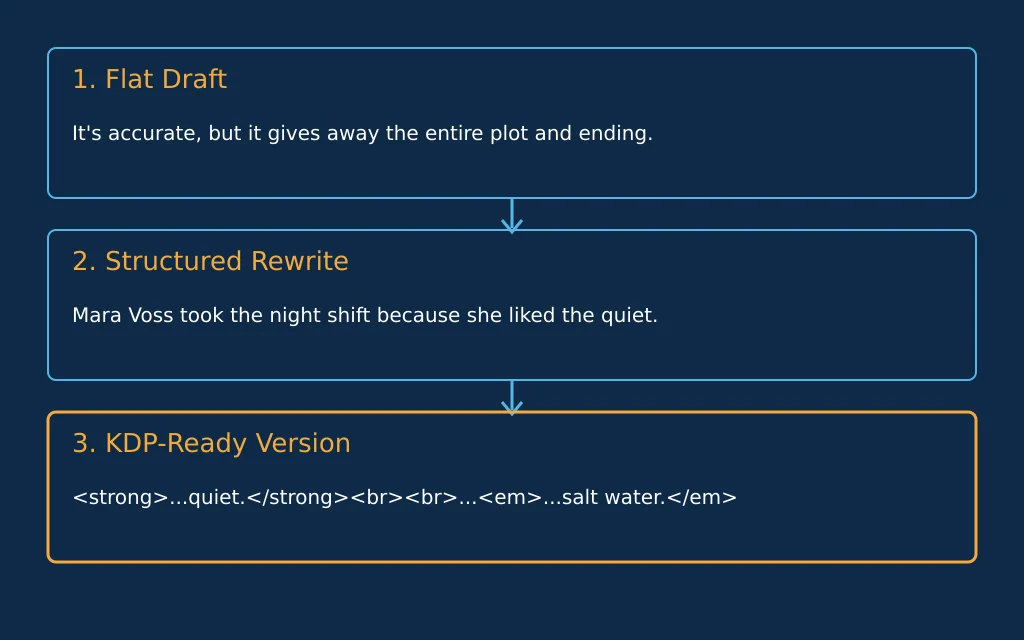
The sample below is invented for this guide, not a real title, so you can watch the whole process without worrying about whether an excerpt is accurate. It's built from the character-count and tag-rendering behavior described above, walked step by step through one made-up book so the formula is shown working, not just described. Call it Salt and Static: a marine radio operator on a remote island picks up a distress call from a boat that sank thirty years earlier.
The Flat Draft
A first draft usually reads like a summary, because that's the easiest thing to write. Mara Voss works alone at a radio station on Cormorant Island, relaying weather reports to fishing boats. One night she receives a distress signal from the Elsinore, a boat that sank in a storm three decades earlier with all hands lost. She investigates the wreck, finds a survivor living in a sea cave, uncovers a cover-up by the island's founding family, and exposes the truth before leaving the island for good. It's accurate. It also gives away the entire plot, including how it ends.
The Structured Rewrite
Running the same book through the hook, stakes and cutoff steps above produces something closer to sales copy. Mara Voss took the night shift at Cormorant Island's radio station because she liked the quiet. Then the Elsinore called in, a boat that sank with all hands thirty years before Mara was born. The voice on the channel knows things only a survivor could know, and the island's oldest families want the signal to stay buried. Mara has three nights before the tide cuts off the old lighthouse road. By then she'll know if she's found a ghost, a hoax, or something the island buried on purpose.
The KDP-Ready Version
The last stage adds only the tags confirmed in the table above:
<strong>Mara Voss took the night shift because she liked the quiet.</strong><br><br>Then the Elsinore called in, a boat that sank with all hands thirty years before Mara was born. The voice on the channel knows things only a survivor could know, and the island's oldest families want the signal to stay buried.<br><br>Mara has three nights before the tide cuts off the old lighthouse road. By then she'll know if she's found a ghost, a hoax, or something the island buried on purpose.<br><br><em>A slow-burn coastal mystery for readers who like their secrets soaked in salt water.</em>
For a first blurb, write the structured version in plain text first: get the hook, stakes and cutoff right, then add only the tags you've checked render in your own listing preview, and nothing else. Two tradeoffs come with that order. Adding tags KDP doesn't support does nothing but clutter the raw text the field shows verbatim, so stick to the handful you've tested. The three-stage formula above suits fiction and narrative nonfiction specifically. A reference or workbook blurb, the kind most low-content books need, should lead with the outcome or the use-case rather than a narrative hook.
Blurb Mistakes That Cost You the Click
Run your draft against this list before you consider it finished.
- Opening with a cliché like a variation on "in a world where" signals generic copy before a reader hits a single specific detail from your book.
- Over-summarizing the plot (walking through most of the story instead of a slice of it) kills the reason to open the book. If your rewrite still reads like the flat draft above, cut it back to the hook and stakes.
- A blurb whose tone doesn't match the book (breezy cover copy over a serious, literary story) sends the wrong reader in and disappoints the right one.
- Watch the character counter continually while you draft. Fixing an overrun after you've finished is harder than trimming as you go, and rewriting a strong line under pressure rarely improves it.
- For nonfiction, skipping your own expertise, why you're the person to write this book, wastes the one piece of credibility a blurb-length credential can add.
Paste Your Blurb Into KDP: What to Check Before You Publish
Once your book blurb reads well as plain text and carries the right tags, a short checklist stands between you and hitting publish.
- Character count: confirm your live counter total sits under 4000, tags included; a word processor's count won't match it.
- Preview: open KDP's built-in listing preview and read the blurb exactly as a shopper will see it, with every tag fully rendered.
- Formatting: check that every tag you added shows as bold, italic or a line break, not as literal angle brackets sitting mid-sentence.
Once the blurb's set, move on to choosing the right Amazon categories and sort your backend search terms with the KDP keyword organizer, since both feed the same listing.
Blurb FAQ
What does blurb mean?
A blurb is the short piece of copy that sells your book without giving away the ending, the kind of text that goes into KDP's Description field. See the full definition and its distinction from an author blurb above.
What is an example of a blurb?
The KDP-ready version in the worked example above is a full one: a hook, a hint of the stakes, and a cutoff before the ending, wrapped in the handful of tags a KDP Description field renders. That three-part shape carries across the genres covered in the five steps above.
What does "blurb" mean in slang?
Informally, people use blurb for any short write-up, not only a book's back-cover copy: a bio blurb, a product blurb, a one-line description tacked onto almost anything. The core sense, short and persuasive, stays the same wherever the word turns up.
How do I write a blurb?
Follow the hook, stakes, cutoff and formatting steps laid out above, then check your draft against the mistakes list before pasting it into KDP. There's no shortcut past writing a plain-text draft first.